 GameBlocker
Block games on your PC for the time you choose.
GameBlocker closes every game, and hides gaming videos and streams in your browser, while your lock is on. You pick the time. Only your trusted person or our support can end it early. Free, for Windows 10 and 11.
What it does, and what it does not
It does
- Closes games from Steam, Epic, GOG, EA, Ubisoft, Battle.net, Riot, Xbox / Microsoft Store and standalone games within about 2 seconds.
- Lets Steam, Epic and the other launchers open, so you can still browse, buy, download and update.
- Closes websites that are only about games (browser games, cloud gaming, game news) in every browser.
- Hides gaming videos, streams and communities on YouTube, Twitch, Kick and Reddit — the rest of those sites stays open.
- A lock can be extended, never shortened. It survives a restart, a changed PC clock and Safe Mode.
It does not
- It does not read your files, screen, keystrokes or browsing history.
- It is not a tool for children: version 1 is for adults (18+).
- It does not block music, study videos, chatting streams or work programs.
- It cannot stop an experienced administrator of the PC. It protects you from impulses, not from a determined expert.
Four ways to lock
Quick lock
One click: 30 minutes, 1, 2 or 4 hours, until the end of the day, or your own time up to 12 months.
Schedule
Days of the week and hours, between two dates. For example Monday–Friday 9:00–17:00, or every night 22:00–07:00.
Pomodoro
Focus with games blocked, then a short break when they are allowed — in turns. For example 25 / 5 four times.
Daily limit
Play up to 30 minutes, 1, 1.5 or 2 hours a day. When the time is used up, games are blocked until midnight.
Before a lock starts you see a short countdown: one click cancels it, so an accidental click costs nothing.
Your trusted person
Choose someone you trust — a friend, partner or mentor. When you start a lock with them:
- they get an early-unlock code by email. Only they decide whether to give it to you;
- they get an email if you try to start a game during the lock (at most once an hour);
- our support can still end the lock too, if your trusted person can't be reached.
Without a trusted person, an early end goes through our support, who first check it is really you (a code sent to your email).
In the browser
Game websites
Browser games, cloud gaming and game news are closed in every browser during a lock, without any extension. Unknown game sites found on your PC are closed too, for the rest of the lock.
The GameBlocker extension
Hides gaming videos on YouTube (in any language), gaming streams on Twitch and Kick, and gaming communities on Reddit. In Chrome, Edge and Brave it installs itself and can't be removed while GameBlocker is installed. In Opera install it once from the Chrome Web Store.
During a lock, private windows and guest mode are off, and developer tools are off on YouTube, Twitch, Kick and Reddit (they keep working everywhere else). Optionally, browsers that can't run the extension (Firefox and others) can be closed during a lock.
Install it (the Windows warning is normal)
GameBlocker is new and not yet digitally signed, so Windows shows a warning for any new, unsigned program. It is safe to continue. Here is exactly what you will see:
Download and open the file
Download GameBlocker-Setup.exe. If your browser says it cannot be downloaded safely, choose Keep. Then open the file.
Click “More info”
Windows shows “Windows protected your PC”. Click More info.
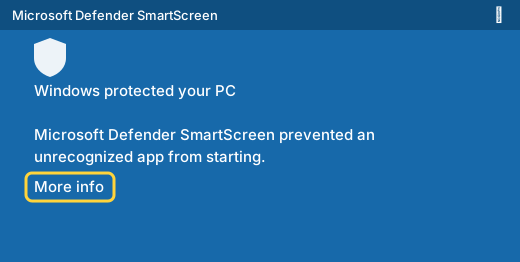
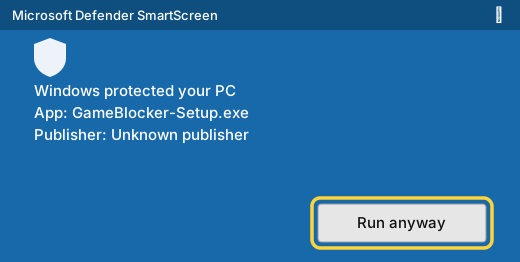
Illustration. The real window looks similar; its text depends on your Windows language. Click “Run anyway”
A new button appears. Click Run anyway.
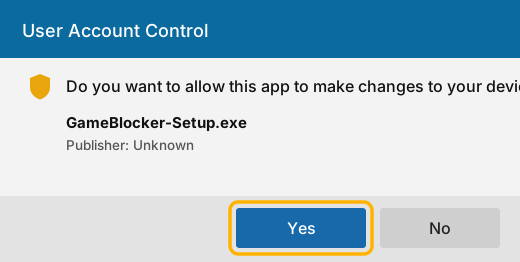
Allow the installer
Windows asks for permission to install a service. Click Yes.
Done
The GameBlocker window opens (a shield icon appears next to the clock). Enter your name and email, confirm the code we send you, and start a lock. Start with one hour to try it: you cannot end a lock yourself.
GameBlocker-Setup.exe, or use the ZIP version: unpack it and run setup.cmd.Check the file (optional)
The SHA-256 checksum of the file you should get:
221244be95a18896d486f95fa4d5f9f0d22f3406009d62cc4c949857174daa0cQuestions
Is it really free?
Yes. Version 1 is free. We want to learn what people need before deciding anything else.
Why does Windows warn me?
Because the program is new and has no digital signature yet. The warning does not mean it is harmful.
Can I end a lock myself?
No, that is the point. You can extend it. To end it early you need the code from your trusted person, or a request to support, who check it is really you and decide.
What if I need my computer for work or study?
Only games and gaming content are blocked. Office programs, browsers, messengers, development tools, music and study videos keep working. If something that is not a game gets closed, tell us in the app (“This is not a game”) and we can allow it for everyone.
I'm a programmer — do I keep my developer tools?
Yes. Developer tools in the browser are turned off only on YouTube, Twitch, Kick and Reddit, and only during a lock.
Chrome says “Managed by your organization”. Why?
That is how Chrome shows any setting installed by a program: here, the GameBlocker extension and the lock-time settings. Uninstalling GameBlocker removes them.
What happens when the internet is down?
The lock keeps working offline and ends on time. Only the early-unlock request and emails wait until the connection returns.
How do I uninstall it?
In Windows Settings → Apps → GameBlocker → Uninstall. This is refused while a lock is active.
Does it work on Mac, Linux or phones?
Not yet. Windows 10 and 11 only.
Is it for my child?
Not in version 1: it is for adults who want to play less.
Support
Questions, ideas or problems: write to gameblockcontact@gmail.com, or use “Write to us” in the app. To end a lock early, use the request button inside the app: it reaches support immediately.